Posted on
More from News


There is little doubting that purchasing a good router is an important part of installing a new network.
While it's true that a higher grade of network cabling can help increase speeds within your infrastructure, having the wrong router can severely hamper performance.
However, having the right router in place can, in no uncertain terms, make or break your network.
But buying the right router is not always a simple task, and there are often a number of considerations that need to be made first.
Do you go through your ISP?
Many service providers will often throw in a router with their package and it can be tempting to play it safe and stick with what you're given.
While this may well give you enough power at first, it is likely to fall short of your network needs further down the line, meaning you will only have to replace it at some stage.
Price
There is a myriad of routers currently available on the market, offering a broad range in price. Ultimately, budget will often dictate which model you are drawn to.
The general rule of thumb is to never go higher than what you need. Only opt for a top-of-the-range router if it's completely essential to your network as your future needs may well see you having to look at upgrading once again.
Type of router
Because many business networks require a router that is a little more sophisticated than those seen in many consumer networks, you will need a router that is beyond that of a simple piece of consumer hardware.
VPN routers are a step up from basic consumer models and contain either wireless or ethernet capabilities.
They also contain an integrated virtual private network (VPN) server and in some cases even offer other advanced features.
Another option is UTM (unified threat management) gateways or firewalls, which boast several advanced features, although they are usually Ethernet-only, with many models containing four to eight ports, meaning that those looking to go wireless will need access points installed. These units often also include virus and malware protection, content filtering, anti-spam functions, and intrusion detection and prevention.
USB ports to increase sharing
While it is always possible to share folders to the network through your operating system, sharing through your router enables the provision of a central storage location and does not need a certain computer to be turned on at all times. USB ports are available on a number of premium consumer models.
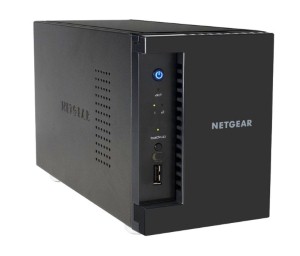
However, business-class routers, gateways and firewalls do not usually contain USB ports. Instead, many such models use a separate component called a network-attached storage (NAS) device.
A NAS unit provides access to many other sharing features, including native sharing, which requires no additional software for you to access storage and you can even control who has access to that information.
Quality of service
A Quality of Service (QoS) feature allows users to prioritise network traffic in a way that suits the needs of their business.
For example, it's possible to give voice and video traffic higher priority than data used for web browsing, while certain computers within your network can be given higher priority than others.
Most premium consumer routers offer this functionality, but bear in mind that the needs of a business may require more customised and sophisticated technology